Python Examples
How to Install
To install the package from PyPI, call:
pip3 install deadwood # python3 -m pip install deadwood
Note
For best performance, advanced users will benefit from compiling the package from sources:
CPPFLAGS="-O3 -march=native" pip3 install quitefastmst deadwood --force --no-binary="quitefastmst,deadwood"
🚧 TO DO (help needed): How to enable OpenMP support on macOS in quitefastmst?
Basic Use
import numpy as np
import pandas as pd
import matplotlib.pyplot as plt
import deadwood

def plot_scatter(X, labels=None):
    deadwood.plot_scatter(X, asp=1, labels=labels, alpha=0.75, markers='o', s=10)
An example noisy dataset[1]:
X1 = np.loadtxt("chameleon_t7_10k.data.gz", ndmin=2)
plot_scatter(X1)
plt.show()
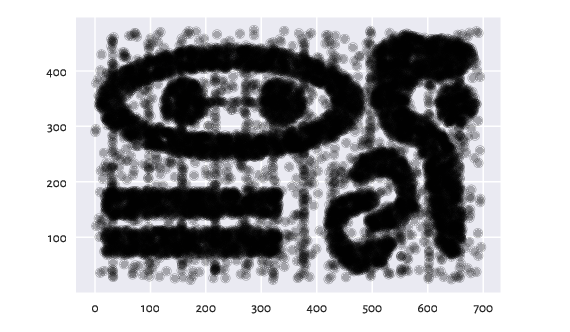
Figure 1 The chameleon_t7_10k dataset
Let us perform outlier detection with Deadwood. Note the scikit-learn-compatible API.
is_outlier = deadwood.Deadwood(max_n_clusters=1).fit_predict(X1)
plot_scatter(X1, is_outlier)
plt.show()
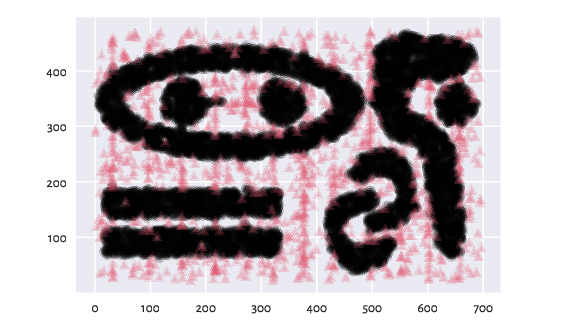
Figure 2 Outlier detection in chameleon_t7_10k
Here is the fraction of detected outliers:
np.mean(is_outlier<0)
## np.float64(0.0998)
Clusters of Unequal Densities
The above dataset consists of clusters of relatively equal densities. Here is an example featuring non-homogeneous subgroups.
X2 = np.loadtxt("chameleon_t8_8k.data.gz", ndmin=2)

plt.subplot(121)
is_outlier = deadwood.Deadwood(max_n_clusters=1).fit_predict(X2)
plot_scatter(X2, is_outlier)

plt.subplot(122)
is_outlier = deadwood.Deadwood().fit_predict(X2)
plot_scatter(X2, is_outlier)

plt.show()
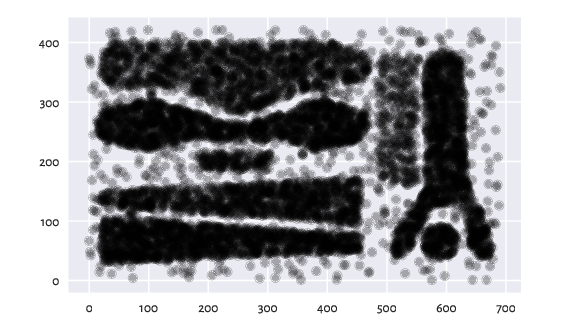
Figure 3 Outlier detection in the chameleon_t8_8k dataset, without and with automatic subcluster detection
In the right subfigure, Deadwood was able to identify three subclusters automatically. In each of them, the outlierness threshold is estimated independently.
Clusters of Highly Imbalanced Sizes
The above dataset consists of relatively large clusters. wut/z2 is an example where two small clusters on the right are treated as anomalous:
X3 = np.loadtxt("z2.data.gz", ndmin=2)
is_outlier = deadwood.Deadwood().fit_predict(X3)
plot_scatter(X3, is_outlier)
plt.show()
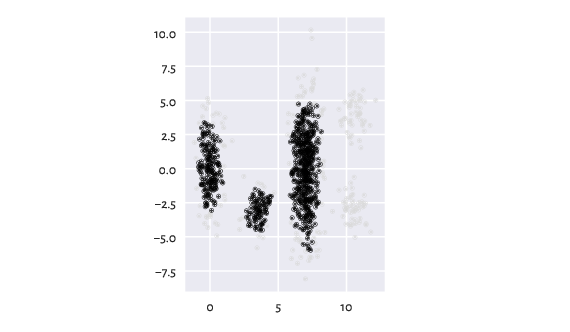
Figure 4 Outlier detection in the z2 dataset
To remedy this, we can decrease the appropriate size threshold
(max_debris_size) parameter:
is_outlier = deadwood.Deadwood(max_debris_size=20).fit_predict(X3)
plot_scatter(X3, is_outlier)
plt.show()
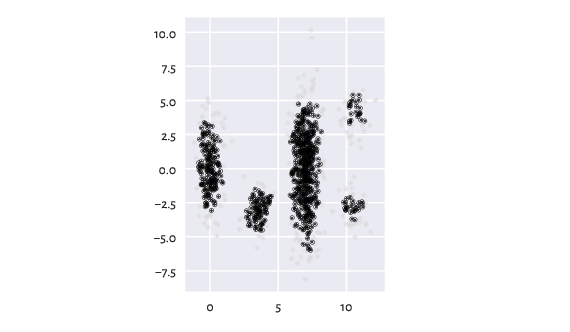
Figure 5 Outlier detection in z2 with smaller max_debris_size
Alternatively, we can first identify the clusters in the dataset (currently, Lumbermark and Genie are supported). Then, we can perform outlier detection in each cluster separately:
import lumbermark
clusters = lumbermark.Lumbermark(n_clusters=5).fit(X3)
is_outlier = deadwood.Deadwood().fit_predict(clusters)
plot_scatter(X3, is_outlier)
plt.show()
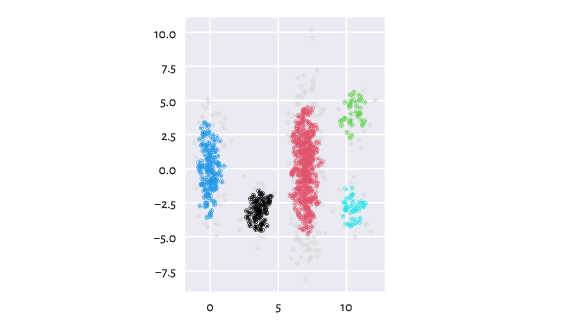
Figure 6 Detected clusters and outliers in z2
Note
To learn more about Python, check out my open-access textbook Minimalist Data Wrangling in Python.